For publishers, Google Ad Manager (GAM) is much more than an ad-serving platform it’s the foundation of their monetization business. It manages ad inventory, user permissions, demand integrations, reporting, and revenue operations. Because of its importance, unauthorized changes within a Google Ad Manager network can have serious consequences.
Recently, there have been increasing reports from publishers about unexpected changes to their Google Ad Manager user access. In some situations, unknown users appeared in the network, administrator permissions were modified, and original owners unexpectedly lost administrative control of their own Google Ad Manager account.
While every case is different, one common factor stands out: poor access management significantly increases the risk of unauthorized activity. Many publishers focus on optimizing CPM, improving viewability, or increasing fill rates but very few regularly review who has access to their Google Ad Manager network. That small oversight can become a major security risk. In this guide, we’ll explain how publishers can better protect their Google Ad Manager network, reduce the chances of unauthorized user activity, and maintain control over one of their most valuable digital assets.
Why Google Ad Manager Security Matters
Every Google Ad Manager network contains critical business information and operational controls.
Depending on the publisher’s setup, it may include:
- Ad inventory and ad units
- User roles and permissions
- Revenue and reporting data
- Advertiser and demand partner configurations
- Yield management settings
- Programmatic monetization setup
If unauthorized users gain Administrator privileges, they may be able to:
- Add new users
- Modify existing permissions
- Remove administrators from the network
- Change important account settings
- Interrupt monetization operations
Even temporary loss of administrative control can create operational challenges, especially for publishers who rely on Google Ad Manager as their primary monetization platform. Protecting your Google Ad Manager network should therefore be considered an essential part of your overall monetization strategy not just an IT responsibility.
Understanding Unauthorized Activity in Google Ad Manager
Unauthorized activity refers to any user action inside your Google Ad Manager network that was performed without approval from the network owner or authorized team members.
Examples include:
- Unknown users being added to the network
- Administrator permissions being granted unexpectedly
- Existing user roles being modified without authorization
- Trusted administrators being removed
- Unexpected changes to user access
Not every unexpected change indicates malicious intent. In larger organizations, user roles may change as teams evolve. However, any permission change that cannot be explained should be investigated immediately.
Early detection is often the difference between a minor security incident and complete loss of administrative control.
How Publishers Lose Access to Their Own Google Ad Manager Network
Many publishers assume that once they create a Google Ad Manager network, they will always retain complete control over it. Unfortunately, that isn’t always the case. In most reported situations, loss of access is not caused by Google Ad Manager itself. Instead, it often results from how access permissions are managed over time. Some common scenarios include:
Granting Administrator Access Too Freely :
A publisher may provide Administrator access to agencies, consultants, developers, monetization partners, or temporary team members for operational purposes. Months later, those users may still retain full administrative permissions even though they no longer work with the publisher. The larger the number of administrators, the greater the overall security risk.
Never Reviewing Existing Users :
Many Google Ad Manager networks continue operating for years without anyone reviewing the Users page. During that time:
- Former employees may still have access.
- Previous agencies may remain administrators.
- Temporary consultants may never be removed.
- Duplicate administrator accounts may accumulate.
Without regular audits, unnecessary permissions can remain active indefinitely.
Poor Permission Management :
Not every user requires Administrator privileges. However, many publishers grant Administrator access simply because it is easier than configuring more appropriate user roles. This creates unnecessary exposure and increases the likelihood of accidental or unauthorized changes.
Lack of Internal Access Governance :
Some organizations do not maintain any record of:
- Who currently has access
- Why access was granted
- When access should be removed
- Which users require Administrator permissions
Without clear governance, user permissions often become difficult to manage as teams grow.
Working with Unverified Third Parties
Before granting elevated permissions, publishers should verify the identity and legitimacy of any individual or organization requesting access to their Google Ad Manager network.
Always understand:
- Why the requested access is necessary.
- Which permission level is actually required.
- How long the access should remain active.
Administrator access should only be granted when there is a clear operational requirement.
Ignoring the Users & Roles Section
The Users section inside Google Ad Manager is one of the most important security areas of the platform. Unfortunately, many publishers rarely review it.
A simple monthly audit can help identify:
- Unknown users
- Duplicate administrators
- Inactive accounts
- Unnecessary permissions
- Recently added users requiring verification
Regular reviews significantly improve visibility into who controls your network
How to Protect Your Google Ad Manager ( GAM )
Choose Your Monetization Partners Carefully
Many publishers grant Google Ad Manager access to agencies, MCM partners, resellers, AdOps specialists, or independent consultants for services such as yield optimization, Google AdX onboarding, or Managed Account (MA) / Managed Inventory (MI) delegation.
Before granting access, verify that the partner is legitimate and understands Google Ad Manager best practices. More importantly, grant only the level of access required for their work. Not every task requires Administrator permissions. Following the principle of least privilege helps reduce the risk of unauthorized changes while allowing partners to perform their responsibilities safely.
Create Custom Roles Based on User Responsibilities
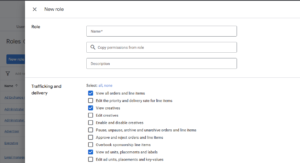
Google Ad Manager allows you to create custom user roles with specific permissions. Instead of assigning broad access, create roles based on each user’s responsibilities.
For example, a user who only needs to manage reports or specific ad operations doesn’t require full Administrator access. Granting only the permissions necessary for their tasks helps reduce security risks while ensuring users have everything they need to perform their work effectively. Following a role-based access approach is one of the best ways to maintain a secure and well-managed Google Ad Manager network.
Review Pending User Invitations
Many publishers focus on active users but overlook pending user invitations in Google Ad Manager.When you or another administrator sends an invitation to add a new user, it may remain in a Pending state if the recipient doesn’t accept it immediately. If that invitation is no longer required, it shouldn’t be left pending indefinitely.
Make it a habit to regularly review pending invitations and cancel any that are no longer necessary. This helps ensure that outdated or unintended invitations cannot be accepted later without your knowledge and keeps your Google Ad Manager network clean and well-managed. As part of your routine security audit, review both active users and pending invitations to maintain better control over your network.
Secure the Google Accounts Linked to Your GAM
Your Google Ad Manager network is only as secure as the Google Accounts that have access to it. If an Administrator’s Google Account is compromised, it could put your entire GAM network at risk.
To strengthen security:
- Enable 2-Step Verification (2FA) for all Administrator accounts.
- Use a strong, unique password for every Google Account with GAM access.
- Avoid sharing login credentials between team members.
- Remove Administrator access from accounts that are no longer actively managed.
Securing the Google Accounts connected to your Google Ad Manager network adds an important layer of protection against unauthorized access.
What to Do If You Suspect Unauthorized Access
If you believe your Google Ad Manager account has been compromised:
- Change your Google account password immediately.
- Revoke access from unknown users.
- Review all administrator permissions.
- Enable or verify Two-Step Verification.
- Review recent Google security activity.
- Contact Google Ad Manager Support if administrative control has been affected.
Taking action quickly can reduce the impact of unauthorized access.
Frequently Asked Questions (FAQs)
Can someone remove me from my own Google Ad Manager account?
Yes. If another user has Administrator privileges, they may be able to remove or modify your access depending on your network’s permissions. This is why Administrator access should only be granted to trusted individuals.
How often should I review my GAM users?
A monthly review is recommended for active teams, while smaller publishers should perform an audit at least once every quarter.
Should I give Admin access to my monetization partner?
Only if it is absolutely necessary and the partner is trusted. In many cases, limited permissions are sufficient to perform required tasks.
Can Google Recover My Lost Google Ad Manager Access?
It depends on the circumstances. If you’ve lost access to your Google Ad Manager network due to unauthorized changes or the removal of your administrator account, you should contact Google Ad Manager Support as soon as possible.
Google may review your request and ask for information to verify ownership of the network before taking any action. While recovery is possible in some cases, it is not guaranteed and depends on the evidence provided and Google’s internal verification process.
Final Thoughts
Protecting your Google Ad Manager network isn’t just about security—it’s about protecting your revenue and maintaining uninterrupted control over your monetization operations. By regularly reviewing user access, limiting Administrator permissions, and working only with trusted partners, you can significantly reduce the risk of unauthorized activity and keep your GAM network secure.